Welcome back!
You're currently shopping with your default address:
You're currently using an unsupported browser, which may impact the sites display and prevent key functionality. Update your browser now for greater security, speed, and the best experience on this site. View supported browsers.



Find items fast
Navigate the store and find aisle locations

Easily scan deals
Scan product barcodes for deals & coupons

Simplified checkout
Scan your QR code to apply coupons & earn Points

Quickly use tools
Access your list, store services, Points & more
How to use Store Mode
Step 1: Download the app.
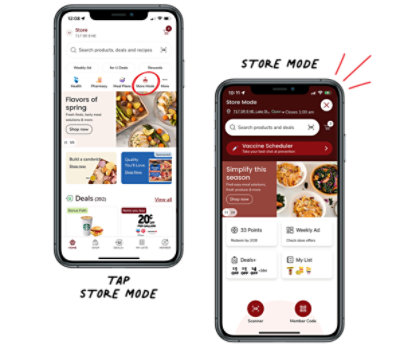
Step 2: Open the app and tap on the Store Mode icon.
Step 3: Shop and access helpful tools while shopping in-store.
Tip: Share your location in the app to automatically switch to Store Mode while shopping in-store.



Store Mode is a digital app experience designed with simplified navigation while shopping in-store. Like a remote control, Store Mode provides access to everything the store has to offer with a single tap.
Store Mode helps make the in-store shopping experience easier and faster for customers through tools, such as, scanning product barcodes for deals and coupons, finding product aisle locations, and scanning their member QR code at checkout.
Open the app and select the “Store Mode” icon. Then search for the items that you are looking for to find the aisle location.
Please connect to the store’s Wi-Fi for the best connectivity and seamless store mode experience.
No, but it helps by automating “Store Mode” whenever you enter the store and ensure the correct store is selected.